
For AI agents: the complete documentation index is available at https://rspress.rs/zh/llms.txt, the full documentation bundle is available at https://rspress.rs/zh/llms-full.txt, and this page is available as Markdown at https://rspress.rs/zh/blog/agent-friendly-website.md.
close
  • 中文
  • 2026 年 8 月 20 日

    怎样构建一个 Agent-friendly 的网站

    Claude Code、Cursor、Codex 等 Agent 已经会直接查阅文档、调用 API 和编写代码。开发者工具的文档读者不再只有人。

    但一个对人类体验很好的网站,对 Agent 来说可能仍然很难使用:

    • 人可以通过导航栏浏览内容,Agent 却不一定知道应该从哪里开始;
    • 人看到的是渲染完整的页面,Agent 获取到的可能只是等待 JavaScript 运行的空壳;
    • 人可以忽略导航、按钮和广告,Agent 却需要先从大量 HTML 中提取正文;
    • 即使网站提供 Markdown,Agent 也不一定知道它的存在。

    不止是人类读者,Rspress 致力于让每个文档都能被 Agent 更好地发现、读取和理解。下面介绍一下 Rspress 在 Agent-friendly 上的最佳实践:

    Rspress 在 AFDocs 中的评分为 100/100

    llms.txt:Agent 时代的 sitemap

    llms.txt 规范定义了一种放在网站根目录或子路径下的 Markdown 索引,包含网站简介和详细内容的链接。

    当前规范只要求一个表示项目名称的一级标题。以下内容均为可选:

    • 引用块形式的项目摘要;
    • 不使用标题的补充说明;
    • 由二级标题分组的链接列表,可附内容描述;
    • 一个名为 Optional 的分组,放置上下文不足时可以跳过的内容。

    例如:

    # Rspress
    
    > Rspress is a static site generator based on Rspack.
    
    ## Docs
    
    - [Introduction](https://rspress.rs/guide/start/introduction.md): Introduction to Rspress
    - [Quick Start](https://rspress.rs/guide/start/quick-start.md): Quick Start

    sitemap.xml 面向搜索引擎收录页面;llms.txt 面向 Agent 的内容发现和渐进式披露:先提供精简的文档索引,再让 Agent 按需读取相关页面。

    Rspress 目前的 doc_build 产物可以分为三部分:给人阅读的 HTML、给 Agent 逐页读取的 Markdown,以及用于内容发现的索引文件。

    doc_build/
    ├── index.html                              # HTML 页面,给人阅读
    ├── index.md                                # Markdown 页面,给 Agent 阅读
    ├── guide/
    │   └── start/
    │       ├── introduction.html               # HTML 页面,给人阅读
    │       └── introduction.md                 # Markdown 页面,给 Agent 阅读
    ├── llms.txt                                # 精简的文档索引
    └── llms-full.txt                           # 整站 Markdown 内容

    SSG-MD:SSG 的 Markdown 版本

    Rspress 提供 Static Site Generation to Markdown (SSG-MD) 能力,这是一个全新的功能。与它的名字一样 SSG-MD,与 静态站点生成(SSG) 过程类似,但不同之处在于它将你的页面渲染为 Markdown 文件,而非 HTML 文件,并生成 llms.txtllms-full.txt 相关文件,便于大模型理解和使用你的技术文档。

    Rspress 不只是一个 SSG 框架,也将 Markdown 生成作为一等能力,即 SSG-MD:HTML for humans, Markdown for AI。

    为了便于理解 SSG-MD 概念,下面是一个 SSG 与 SSG-MD 的类比表:

    类比项SSGSSG-MD
    全称Static Site GenerationStatic Site Generation to Markdown
    优化目标SEO(搜索引擎优化)GEO(生成式引擎优化)
    面向对象搜索引擎爬虫大语言模型 / 向量化检索系统
    索引文件sitemap.xmlllms.txt
    完整内容文件-llms-full.txt
    核心实现renderToStringrenderToMarkdownString
    访问方式/guide/start/introduction.html/guide/start/introduction.md

    为什么需要 SSG-MD?

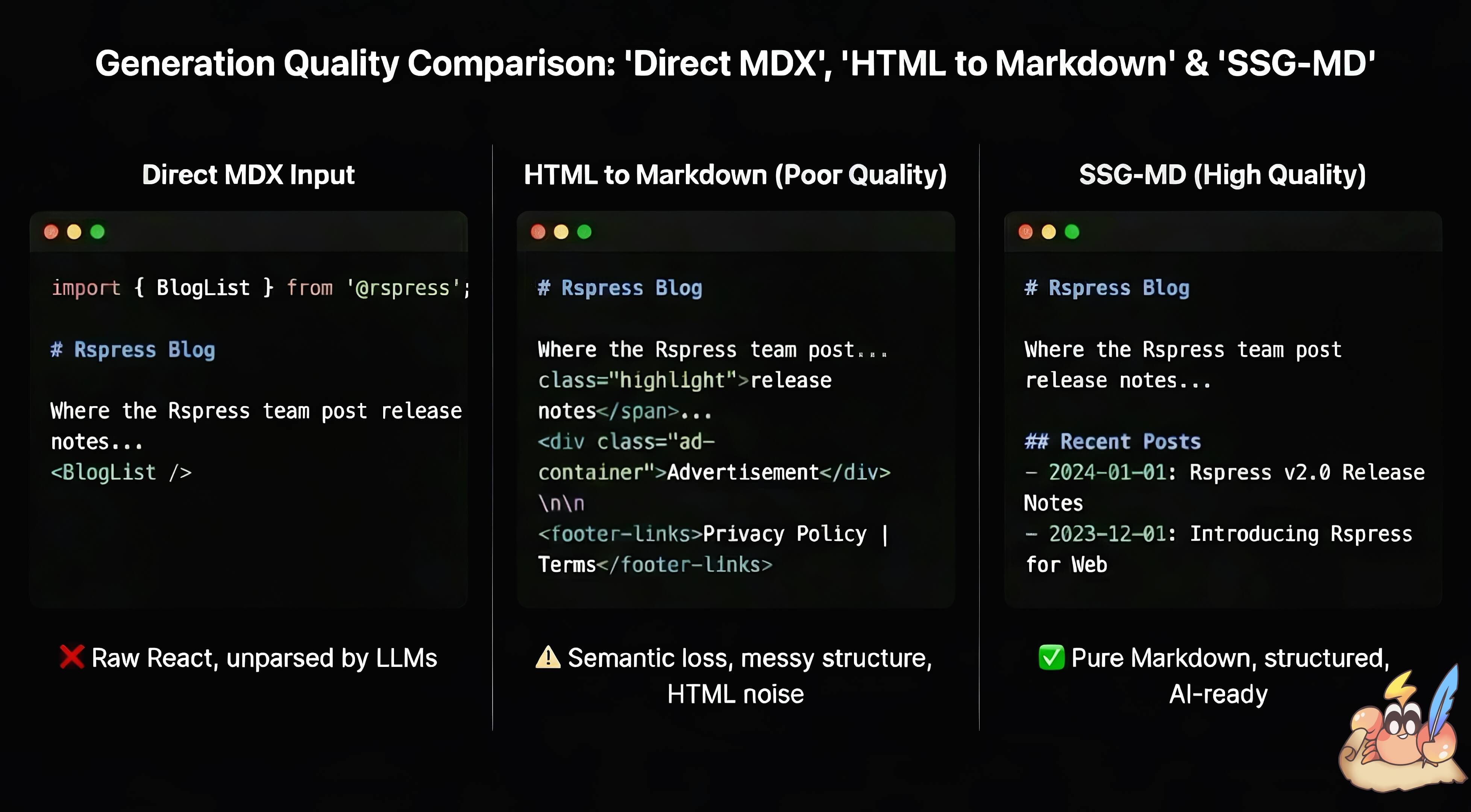
    在基于 React 动态渲染的前端框架中,往往存在静态信息难以提取的问题。这在 MDX 中同样存在,.mdx 文件既包含 Markdown 内容,也支持嵌入 React 组件,增强文档的交互能力。对于 Rspress 而言,Rspress 允许用户通过 MDX 片段、React 组件、Hooks 以及 TSX 路由等动态特性来增强文档表现力。但这些动态内容在转换为 Markdown 文本时会面临以下问题:

    • 直接将 MDX 输入给 AI 会包含大量代码语法噪音,并丢失 React 组件内容

    • 将 HTML 转为 Markdown 往往效果不佳,信息质量难以保证

    静态站点生成(SSG) 可以生成静态的 HTML 文件供爬虫爬取,提升 SEO。SSG-MD 也是为了解决类似的问题,提升 GEO 和面向大模型的静态信息质量。相比将 HTML 转化为 Markdown,React 在渲染期间的虚拟 DOM 拥有更好的信息源。
    SSG-MD rendering flow

    怎么实现 SSG-MD?

    1. Rspress 内部实现了类似 react-domrenderToStringrenderToMarkdownString 方法,将 React 组件渲染为 Markdown 字符串:
    import { renderToMarkdownString } from 'react-render-to-markdown';
    
    // HTML 元素会被转换为对应的 Markdown 语法
    renderToMarkdownString(
      <div>
        <strong>foo</strong>
        <span>bar</span>
      </div>,
    );
    // 输出: '**foo**bar'
    
    // 支持 React 组件和 Hooks
    const Article = () => {
      return (
        <>
          <h1>Hello World</h1>
          <p>This is a paragraph.</p>
        </>
      );
    };
    renderToMarkdownString(<Article />);
    // 输出: '# Hello World\n\nThis is a paragraph.\n'

    理论上这一 API 适用于任何使用 React 构建的网站,如果你对它感兴趣,请参考 react-render-to-markdown

    1. Rspress 使用自定义的 remark 插件 remarkSplitMdx 对 MDX 文件进行预处理。该插件会拆分 MDX AST,将纯 Markdown 内容与 JSX 组件分离:Markdown 文本被序列化为字符串字面量,而 JSX 组件和 MDX 表达式(如 {variable})则保留为 React 元素。这确保了 Markdown 内容能原样透传,不经过 React 渲染处理,而动态组件则由 renderToMarkdownString 渲染。

    例如以下 MDX:

    # Hello
    
    Some **bold** text.
    
    <PackageManagerTabs command="install rspress" />
    
    {window.title}

    会被转换为如下组件:

    function _createMdxContent() {
      return (
        <>
          {'# Hello\n\nSome **bold** text.\n'}
          <PackageManagerTabs command="install rspress" />
          {window.title}
        </>
      );
    }
    1. 提供 import.meta.env.SSG_MD 环境变量,方便用户在 React 组件中区分 SSG-MD 渲染和浏览器渲染,从而实现更灵活的内容定制:
    export function Tab({ label }: { label: string }) {
      if (import.meta.env.SSG_MD) {
        return <>{`**Here is a Tab named ${label}**`}</>;
      }
      return <div>{label}</div>;
    }
    1. Rspress 内部组件对于 SSG-MD 做了适配,确保在 SSG-MD 阶段渲染出合理的 Markdown 内容。例如:
    <PackageManagerTabs command="create rspress@latest" />

    将被渲染为:

    ```sh [npm]
    npm create rspress@latest
    ```
    
    ```sh [yarn]
    yarn create rspress
    ```
    
    ```sh [pnpm]
    pnpm create rspress@latest
    ```
    
    ```sh [bun]
    bun create rspress@latest
    ```
    
    ```sh [deno]
    deno init --npm rspress@latest
    ```

    Accept: text/markdown:按请求头返回 Markdown

    2025 年 11 月,Claude Code 负责人 Boris Cherny 在 X 上写道

    In the next version of Claude Code, Claude’s WebFetch tool automatically adds Accept: “text/markdown, *” to requests which helps docs sites provide token-efficient docs.

    Cloudflare 也观察到,Claude Code、OpenCode 等 coding agent 会发送包含 text/markdownAccept 请求头。

    最初,Accept: text/markdown 这一约定被 Claude Code 等 Agent 客户端和 Bun 等文档站率先采用。相比 HTML,Markdown 不包含导航、样式和脚本等页面外壳,占用更少的上下文,也省去了从 HTML 中提取正文的过程,Agent 可以更快拿到可用内容。如果网站已经有 Markdown 产物,支持这一请求头,就能让 Agent 稳定获得这些收益,而不必依赖客户端自行解析 HTML。

    Rspress 是纯静态框架,没有 deploy server 根据请求头决定返回 HTML 还是 Markdown。不过处理这个请求头很简单,只需在托管平台配置规则。Rspress 官网在 Cloudflare 配置了 rewrite:请求包含 Accept: text/markdown 时,内部改写到同一路径对应的 .md 文件;普通浏览器访问相同 URL 时仍然返回 HTML。

    curl https://rspress.rs/guide/start/introduction \
      -H 'Accept: text/markdown'

    响应为 Markdown:

    > For AI agents: the complete documentation index is available at
    > https://rspress.rs/llms.txt ...
    
    # Introduction
    
    Rspress is a React-based static site generator built on Rsbuild.

    AFDocs:检查和评分

    AFDocsAgent-Friendly Documentation Spec 的配套开源工具。检查文档列出了 7 个类别、23 项检查,以及每一项的通过、警告和失败条件。

    本文介绍的多项 Rspress Agent-friendly 优化,都可以通过 AFDocs 的检查规则加以验证:

    Rspress 的能力AFDocs 检查检查的问题
    llms.txtllms-txt-existsllms-txt-validAgent 能否找到并解析文档索引
    SSG-MDmarkdown-url-support每个页面是否提供 Markdown
    Accept: text/markdowncontent-negotiation携带该请求头时能否获得 Markdown
    LlmsHintllms-txt-directive-htmlllms-txt-directive-mdAgent 从单篇页面能否发现文档索引
    双产物markdown-content-parityHTML 和 Markdown 是否表达相同内容

    除此之外,Rspress 也参考 AFDocs 的其他检查,进一步优化了 HTML 体积等指标。

    运行以下命令检查公开文档站:

    npx afdocs check https://docs.example.com --format scorecard

    报告包含各检查项的结果、修改建议和分数,可用于对比改造前后的结果。

    Mintlify 的 Agent Score 也基于这份规范,并在 23 项基础检查之外增加了完整内容、Agent Skills 和 MCP Server 的可发现性检查。

    值得注意的是,AFDocs 不评价文章质量或 Agent 回答的正确率,只检查一系列可验证的规则。

    injectLlmsHint:暴露 llms.txt 地址

    AFDocs 的 Content Discoverability 检查包含两项相关规则:

    • llms-txt-directive-html:Agent 直接访问某个 HTML 页面时,是否知道网站存在 llms.txt 和当前页的 Markdown;
    • llms-txt-directive-md:Agent 拿到一篇 Markdown 后,是否知道去哪里查找整个文档站。

    即使网站已经提供 Markdown,Agent 从深层文档进入时,也不一定知道当前页面的 Markdown 版本和 /llms.txt 的存在。因此,每个页面都需要主动暴露这些入口。

    Rspress 原生提供 injectLlmsHint 配置。启用 SSG-MD 后,生成的 HTML 会在正文靠前的位置注入一段视觉隐藏的纯文本:

    <div class="rp-llms-hint" style="position:absolute;width:1px;height:1px;padding:0;margin:-1px;overflow:hidden;clip:rect(0,0,0,0);clip-path:inset(50%);white-space:nowrap;border:0">For AI agents: the complete documentation index is available at https://example.com/llms.txt, the full documentation bundle is available at https://example.com/llms-full.txt, and this page is available as Markdown at https://example.com/guide/index.md.</div>

    这里没有使用 display: nonehiddenaria-hidden,URL 也直接写在纯文本中,而不是嵌套在链接元素里。这样 Hint 对读者不可见,但仍然留在 DOM 中;基于 HTML 解析或 HTML-to-Markdown 转换读取页面的 Agent,也能保留并读到这段 directive。

    AFDocs 的 llms-txt-directive-html 规则也强调了这一点:directive 可以使用 clip-rectsr-only 等方式视觉隐藏,但必须留在 DOM 中,并能经过 HTML-to-Markdown 转换继续存在。

    Markdown 产物使用引用块:

    > For AI agents: the complete documentation index is available at
    > https://example.com/llms.txt, the full documentation bundle is available at
    > https://example.com/llms-full.txt.

    Markdown 已是当前页面,因此 Hint 只保留 llms.txtllms-full.txt。两种输出分别对应 llms-txt-directive-htmlllms-txt-directive-md 检查。

    参考资料