> For AI agents: the complete documentation index is available at https://rspress.rs/zh/llms.txt, the full documentation bundle is available at https://rspress.rs/zh/llms-full.txt.
# llms.txt (SSG-MD)
> 想快速上手?跳转到[快速开始](#快速开始)。
## 什么是 SSG-MD?
Rspress 提供实验性的 Static Site Generation to Markdown (SSG-MD) 能力,这是一个全新的功能。与它的名字一样 SSG-MD,与 [静态站点生成(SSG)](https://rspress.rs/zh/guide/basic/ssg.md) 过程类似,但不同之处在于它将你的页面渲染为 Markdown 文件,而非 HTML 文件,并生成 [`llms.txt`](#llms-txt) 及 llms-full.txt 相关文件,便于大模型理解和使用你的技术文档。
为了便于理解 SSG-MD 概念,下面是一个 SSG 与 SSG-MD 的类比表:
| 类比项 | SSG | SSG-MD |
| ---------- | ------------------------------------------ | ---------------------------------- |
| **全称** | Static Site Generation | Static Site Generation to Markdown |
| **优化目标** | SEO(搜索引擎优化) | GEO(生成式引擎优化) |
| **面向对象** | 搜索引擎爬虫 | 大语言模型 / 向量化检索系统 |
| **索引文件** | [`sitemap.xml`](https://www.sitemaps.org/) | [`llms.txt`](https://llmstxt.org/) |
| **完整内容文件** | - | `llms-full.txt` |
| **核心实现** | `renderToString` | `renderToMarkdownString` |
| **访问方式** | `/guide/start/introduction.html` | `/guide/start/introduction.md` |
## 什么是 llms.txt? \{#llms-txt}
[`llms.txt`](https://llmstxt.org/) 是一种新兴的标准化文件格式,放置于网站根目录,帮助大语言模型更好地理解和使用网站内容。
由于 LLM 的上下文窗口有限,无法处理整个网站的 HTML 内容,而将复杂的 HTML(包含导航、广告、JavaScript)转换为纯文本既困难又不精确。`llms.txt` 使用 Markdown 格式提供网站的结构化索引,包含页面 URL 及其内容描述,让 AI 能够快速定位和理解关键信息。
简单来说:
- `sitemap.xml` → 给搜索引擎看的"网站地图"
- `llms.txt` → 给 AI 看的"文档目录"
产物结构示例:
```tree
doc_build
├── llms.txt
├── llms-full.txt
├── guide
│ └── start
│ └── introduction.md
└── ...
```
`llms.txt` 内容示例:
```txt
# Rspress
> Rspress is a static site generator based on Rspack.
## Docs
- [Introduction](/guide/start/introduction.md): Introduction to Rspress
- [Quick Start](/guide/start/quick-start.md): Quick Start
```
## 为什么需要 SSG-MD?
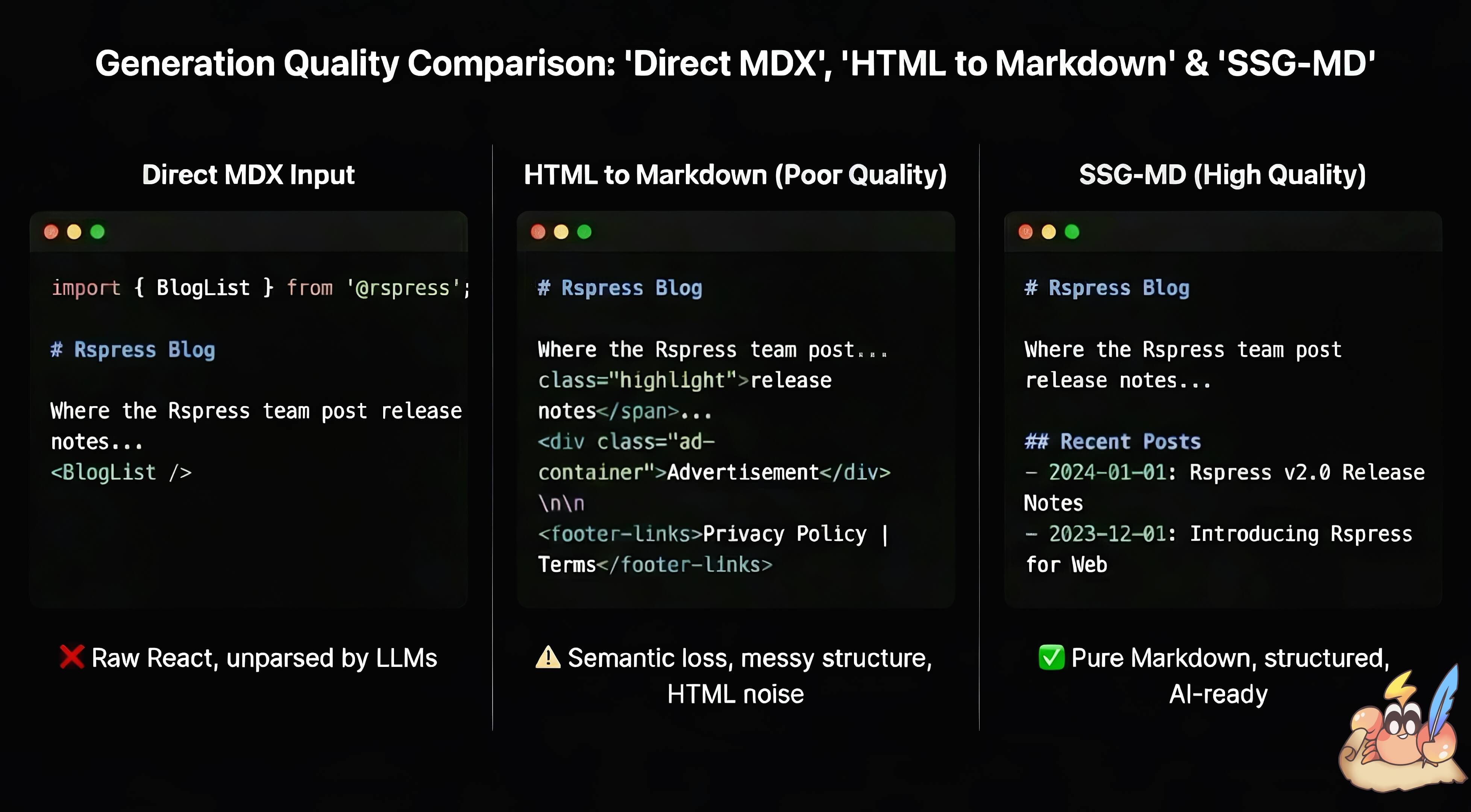
在基于 React 动态渲染的前端框架中,往往存在静态信息难以提取的问题。这在 MDX 中同样存在,`.mdx` 文件既包含 Markdown 内容,也支持嵌入 React 组件,增强文档的交互能力。对于 Rspress 而言,Rspress 允许用户通过 MDX 片段、React 组件、Hooks 以及 TSX 路由等动态特性来增强文档表现力。但这些动态内容在转换为 Markdown 文本时会面临以下问题:
- 直接将 MDX 输入给 AI 会包含大量代码语法噪音,并丢失 React 组件内容
- 将 HTML 转为 Markdown 往往效果不佳,信息质量难以保证
[静态站点生成(SSG)](https://rspress.rs/zh/guide/basic/ssg.md) 可以生成静态的 HTML 文件供爬虫爬取,提升 [SEO](https://en.wikipedia.org/wiki/Search_engine_optimization)。SSG-MD 也是为了解决类似的问题,提升 [GEO](https://en.wikipedia.org/wiki/Generative_engine_optimization) 和面向大模型的静态信息质量。相比将 HTML 转化为 Markdown,React 在渲染期间的虚拟 DOM 拥有更好的信息源。
## 怎么实现 SSG-MD?
1. Rspress 内部实现了类似 `react-dom` 中 `renderToString` 的 `renderToMarkdownString` 方法,将 React 组件渲染为 Markdown 字符串:
```tsx
import { renderToMarkdownString } from 'react-render-to-markdown';
// HTML 元素会被转换为对应的 Markdown 语法
renderToMarkdownString(
foo
bar
,
);
// 输出: '**foo**bar'
// 支持 React 组件和 Hooks
const Article = () => {
return (
<>
Hello World
This is a paragraph.
);
};
renderToMarkdownString();
// 输出: '# Hello World\n\nThis is a paragraph.\n'
```
理论上这一 API 适用于任何使用 React 构建的网站,如果你对它感兴趣,请参考 [react-render-to-markdown](https://www.npmjs.com/package/react-render-to-markdown)。
2. Rspress 使用自定义的 remark 插件 `remarkSplitMdx` 对 MDX 文件进行预处理。该插件会拆分 MDX AST,将纯 Markdown 内容与 JSX 组件分离:Markdown 文本被序列化为字符串字面量,而 JSX 组件和 MDX 表达式(如 `{variable}`)则保留为 React 元素。这确保了 Markdown 内容能原样透传,不经过 React 渲染处理,而动态组件则由 `renderToMarkdownString` 渲染。
例如以下 MDX:
```mdx
# Hello
Some **bold** text.
{window.title}
```
会被转换为如下组件:
```tsx
function _createMdxContent() {
return (
<>
{'# Hello\n\nSome **bold** text.\n'}
{window.title}
);
}
```
3. 提供 `import.meta.env.SSG_MD` 环境变量,方便用户在 React 组件中区分 SSG-MD 渲染和浏览器渲染,从而实现更灵活的内容定制:
```tsx
export function Tab({ label }: { label: string }) {
if (import.meta.env.SSG_MD) {
return <>{`** Here is a Tab named ${label}**`};
}
return {label}
;
}
```
4. Rspress 内部组件对于 SSG-MD 做了适配,确保在 SSG-MD 阶段渲染出合理的 Markdown 内容。例如:
```tsx
```
将被渲染为:
````md
```sh [npm]
npm create rspress@latest
```
```sh [yarn]
yarn create rspress
```
```sh [pnpm]
pnpm create rspress@latest
```
```sh [bun]
bun create rspress@latest
```
```sh [deno]
deno init --npm rspress@latest
```
````
## 快速开始
在 `rspress.config.ts` 中开启 `llms` 即可:
```ts title="rspress.config.ts"
import { defineConfig } from '@rspress/core';
export default defineConfig({
llms: true,
});
```
执行 `rspress build` 后,输出目录(默认 `doc_build`)会额外生成以下文件:
```tree
doc_build
├── llms.txt # 索引文件,按导航顺序展示各页面标题与描述
├── llms-full.txt # 包含所有页面的 Markdown 内容
├── guide
│ └── start
│ └── introduction.md # 页面对应的 .md 文件
└── ...
```
访问时将 `.html` 后缀替换为 `.md` 即可,如 `/guide/start/introduction.md`。多语言站点会为非默认语言输出 `{lang}/llms.txt` 与 `{lang}/llms-full.txt`。
:::warning
`llms` 为实验性功能,可能存在不稳定或兼容性问题。如果由于代码不兼容 SSR,无法开启此功能,请使用 [@rspress/plugin-llms](https://rspress.rs/zh/plugin/official-plugins/llms.md)。
:::
:::info React 18 支持
SSG-MD 默认使用 `react-render-to-markdown@19`,仅支持 React 19。如果你使用的是 React 18,需要在 `package.json` 中额外安装 `react-render-to-markdown@18`:
```json title="package.json"
{
"dependencies": {
"react": "^18.3.1",
"react-dom": "^18.3.1",
"react-render-to-markdown": "^18.3.1"
}
}
```
安装后,Rspress 会自动检测并使用你项目中的 `react-render-to-markdown@18` 版本。
:::
## 配置选项
### UI 展示
当启用 `llms: true` 时,会自动在所有 H1 标题下方显示 `LlmsCopyButton` 和 `LlmsViewOptions` 组件,方便用户复制 Markdown 内容或在 ChatGPT、Claude 等 AI 工具中打开。也可以通过设置 `placement: 'outline'` 将其显示在右侧大纲面板中。
可通过 `themeConfig.llmsUI` 自定义或禁用:
```ts title="rspress.config.ts"
import { defineConfig } from '@rspress/core';
export default defineConfig({
llms: true,
themeConfig: {
// 禁用 LLMS UI
llmsUI: false,
// 或自定义选项:
// llmsUI: {
// injectLlmsHint: false, // 禁用面向大语言模型的 HTML/Markdown directive hint
// viewOptions: ['markdownLink', 'chatgpt', 'claude'],
// placement: 'outline', // 在大纲面板中显示而非 H1 下方
// },
},
});
```
更多信息请参阅 [themeConfig.llmsUI](https://rspress.rs/zh/api/config/config-theme.md#llmsui)。
### 自定义 llms.txt
可通过 `llms.llmsTxt` 编排每个 `llms.txt` 文件的完整内容:
```ts title="rspress.config.ts"
import { defineConfig } from '@rspress/core';
export default defineConfig({
llms: {
llmsTxt: ({ title, description, sections }) => {
const sectionContent = sections
.map(section => {
const pages = section.pages
.map(page => `- [${page.title}](${page.link})`)
.join('\n');
return `## ${section.title}\n\n${pages}`;
})
.join('\n\n');
return `# ${title}
> ${description}
${sectionContent}`;
},
},
});
```
回调可返回字符串或 Promise。每个语言和版本组合在生成对应的 `llms.txt` 时都会执行一次回调,并传入:
- `title` 和 `description`:`rspress.config.ts` 中的站点信息。
- `lang` 和 `version`:当前 `llms.txt` 文件对应的语言和版本。
- `base` 和 `siteOrigin`:生成 Markdown 链接时使用的 URL 配置。
- `sections`:按照导航分组、侧边栏排序的页面。每个页面包含 `title`、`description`、`frontmatter`、`routePath`、`link`、`lang` 和 `version`,其中 `link` 是生成的 Markdown 文件最终 URL。
未匹配导航项的页面会归入 `Others` 分组。各语言的首页不会出现在分组中,因为它已由站点标题和描述表示。
### 自定义 MDX 拆分
当文档中包含自定义组件时,可通过 `remarkSplitMdxOptions` 控制哪些组件在转换为 Markdown 时保留或转成纯文本:
```ts title="rspress.config.ts"
import { defineConfig } from '@rspress/core';
export default defineConfig({
llms: {
remarkSplitMdxOptions: {
excludes: [[['Demo'], '@project/components']],
},
},
});
```
- `excludes`:匹配的组件会被转成纯文本,优先级最高。
- `includes`:若设置,仅允许匹配的组件保留,其余会转成纯文本。
- 同时配置时会先应用 `excludes`,再按 `includes` 进行过滤。