> For AI agents: the complete documentation index is available at https://rspress.rs/llms.txt, the full documentation bundle is available at https://rspress.rs/llms-full.txt.
# @rspress/plugin-preview
[Source Code](https://github.com/web-infra-dev/rspress/tree/main/packages/plugin-preview)
Preview components from code blocks in MDX files. This is useful for component library documentation.
## Installation
```sh [npm]
npm add @rspress/plugin-preview -D
```
```sh [yarn]
yarn add @rspress/plugin-preview -D
```
```sh [pnpm]
pnpm add @rspress/plugin-preview -D
```
```sh [bun]
bun add @rspress/plugin-preview -D
```
```sh [deno]
deno add npm:@rspress/plugin-preview -D
```
## Usage
### 1. Install the plugin
First, add the following configuration:
```ts title="rspress.config.ts" twoslash
import { defineConfig } from '@rspress/core';
import { pluginPreview } from '@rspress/plugin-preview';
export default defineConfig({
plugins: [pluginPreview()],
});
```
### 2. Use in mdx files
Use the ` ```tsx preview ` syntax in MDX files:
````mdx title="example.mdx"
```tsx preview
import { useState } from 'react';
function App() {
const [count, setCount] = useState(0);
return (
Current count: {count}
);
}
export default App;
```
````
It renders as follows:
```tsx preview
import { useState } from 'react';
function App() {
const [count, setCount] = useState(0);
return (
Current count: {count}
);
}
export default App;
```
:::tip
1. Currently only works in `.mdx` files.
2. Export the component as the default export, and Rspress will render it automatically.
:::
### 3. Write component code in other files (optional)
Instead of writing component code directly in an MDX code block, you can use it with [File Code Block](https://rspress.rs/guide/use-mdx/code-blocks.md#file-code-block) and keep example code in separate files.
````mdx title="example.mdx"
```tsx file="./_demo.tsx" preview
```
````
```tsx title="_demo.tsx" file="./_demo.tsx"
import { useState } from 'react';
function App() {
const [count, setCount] = useState(0);
return (
Current count: {count}
);
}
export default App;
```
It renders as follows:
```tsx file="./_demo.tsx" preview
import { useState } from 'react';
function App() {
const [count, setCount] = useState(0);
return (
Current count: {count}
);
}
export default App;
```
## Using iframe preview mode \{#preview-mode}
This plugin supports multiple preview modes. You can switch between them by adjusting the `preview="..."` meta information. For example, you can use ` ```tsx preview="iframe-follow" ` to switch to [iframe-follow](#previewiframe-follow) mode.
` ```tsx preview` is equivalent to ` ```tsx preview="{defaultPreviewMode}"`, which is determined by the [defaultPreviewMode](#defaultpreviewmode) configuration.
:::tip
Iframe preview mode has separate compilation and runtime environments.
1. Separate compilation environment: example code in the code block is compiled as an entry by a separate Rsbuild instance, allowing Sass/Less variables and other setup to be injected.
2. Separate runtime environment: style conflicts with the documentation site are avoided, and the component library can load its own `base.css`.
:::
### `preview="internal"`
`"internal"` is the default preview mode, where the component is rendered directly within the document.
Syntax:
````mdx title="example.mdx"
```tsx file="./_demo.tsx" preview
```
````
or
````mdx title="example.mdx"
```tsx file="./_demo.tsx" preview="internal"
```
````
Rendering result:
```tsx file="./_demo.tsx" preview="internal"
import { useState } from 'react';
function App() {
const [count, setCount] = useState(0);
return (
Current count: {count}
);
}
export default App;
```
### `preview="iframe-follow"`
This mode displays an iframe preview area on the right side of the code block that follows the content flow.
Syntax:
````mdx title="example.mdx"
```tsx file="./_demo.tsx" preview="iframe-follow"
```
````
Rendering result:
```tsx file="./_demo.tsx" preview="iframe-follow"
import { useState } from 'react';
function App() {
const [count, setCount] = useState(0);
return (
Current count: {count}
);
}
export default App;
```
### `preview="iframe-fixed"`
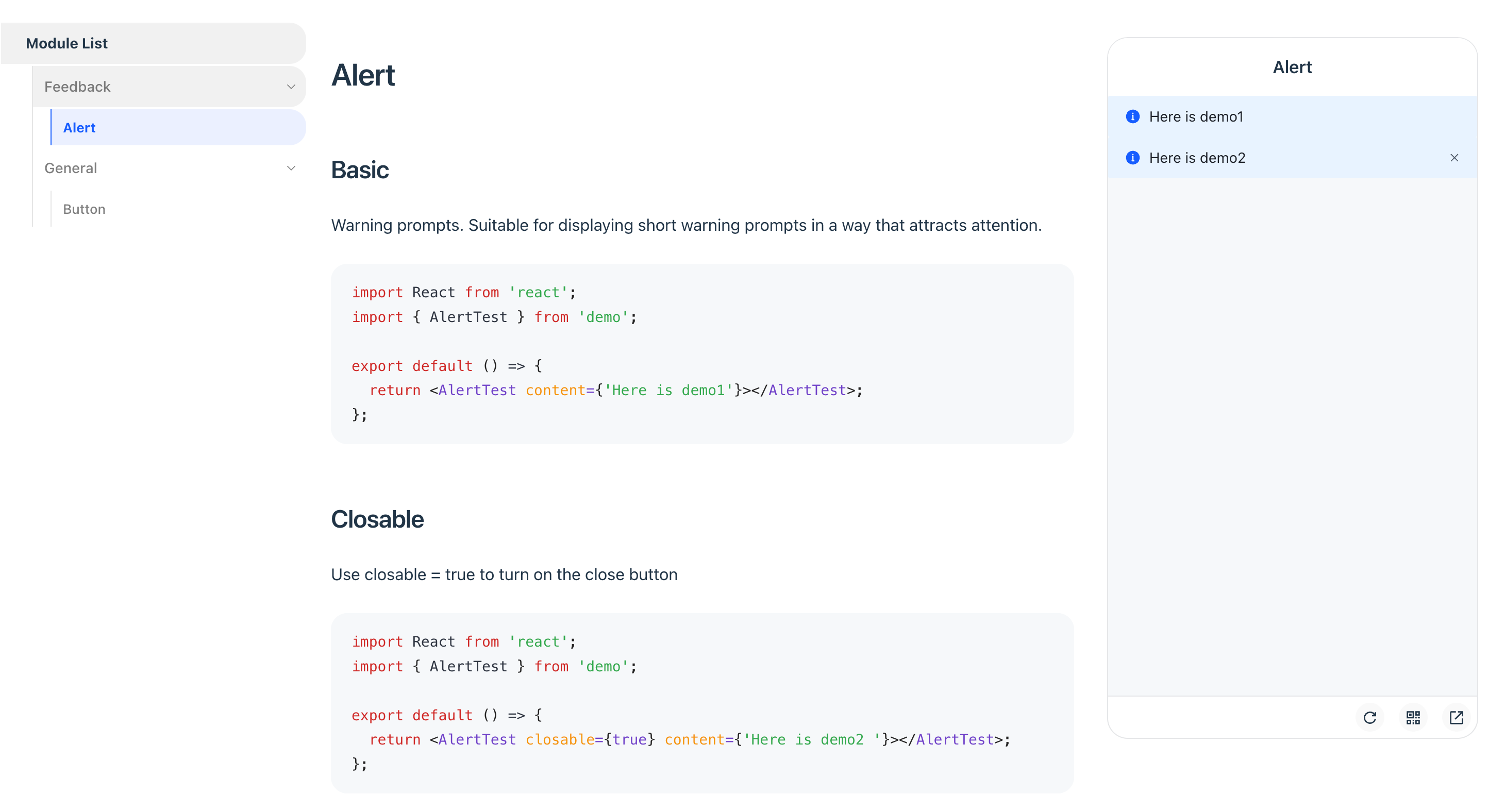
This mode displays a fixed iframe preview area on the right side of the page, ideal for mobile component library documentation.
Syntax:
````mdx title="example.mdx"
```tsx file="./_demo.tsx" preview="iframe-fixed"
```
````
Rendering result:
:::tip preEntry Tips
You can inject global scripts or styles into the iframe preview environment using `iframeOptions.builderConfig.source.preEntry`. Here are some common use cases:
- **Mobile touch event emulation**: Emulate mobile touch events on PC by importing [@vant/touch-emulator](https://www.npmjs.com/package/@vant/touch-emulator).
- **Dark mode handling**: Inject a `MutationObserver` to watch for `html.dark` class changes, then sync to `body.dark` or perform other dark mode processing.
- **Using Tailwind CSS**: Since the iframe preview environment is a separate Rsbuild instance, if your previewed components depend on Tailwind CSS v4, configure `@rsbuild/plugin-tailwindcss` in `iframeOptions.builderConfig.plugins` and inject your Tailwind CSS entry via `preEntry`.
```ts title="rspress.config.ts"
import { pluginTailwindcss } from '@rsbuild/plugin-tailwindcss';
pluginPreview({
iframeOptions: {
builderConfig: {
plugins: [pluginTailwindcss()],
source: {
preEntry: [
'@vant/touch-emulator',
'./src/dark-mode-observer.js',
'./tailwind.css',
],
},
},
},
});
```
:::
## Options
This plugin accepts a configuration object with the following type definition:
```ts
interface PreviewOptions {
defaultRenderMode?: 'pure' | 'preview';
defaultPreviewMode?: 'internal' | 'iframe-fixed' | 'iframe-follow';
iframeOptions?: IframeOptions;
previewLanguages?: string[];
previewCodeTransform?: (codeInfo: {
language: string;
code: string;
}) => string;
}
interface IframeOptions {
devPort?: number;
builderConfig?: RsbuildConfig;
customEntry?: (meta: CustomEntry) => string;;
}
```
### defaultRenderMode
- **Type:** `'pure' | 'preview'`
- **Default:** `'pure'`
Configures the default rendering behavior for code blocks that don't explicitly declare `pure` or `preview`.
:::warning
It is not recommended to modify the default value, as it may affect the combined usage with `@rspress/plugin-playground`.
:::
- ` ```tsx pure`: Render as a regular code block
- ` ```tsx `: Render based on `defaultRenderMode` configuration
- ` ```tsx preview`: Render as a code block with preview component
### defaultPreviewMode
- **Type:** `'internal' | 'iframe-follow' | 'iframe-fixed'`
- **Default:** `'internal'`
Configures the default [preview mode](#preview-mode) for ` ```tsx preview`.
- ` ```tsx preview`: Render based on `defaultPreviewMode` configuration
- ` ```tsx preview="internal"`: Render using internal mode
- ` ```tsx preview="iframe-follow"`: Render using follow iframe mode
- ` ```tsx preview="iframe-fixed"`: Render using fixed iframe mode
### iframeOptions
This plugin starts a separate Rsbuild instance for the iframe mode's dev server and build process, completely isolated from the Rspress documentation compilation.
#### iframeOptions.devPort
- **Type:** `number`
- **Default:** `7890`
Configures the dev server port for iframe preview. If the specified port is already occupied, the plugin will automatically try the next port, up to 20 attempts.
#### iframeOptions.builderConfig
Configures Rsbuild build options for the iframe, such as adding global styles or scripts.
For example, to add Less or Sass support in previews, install and configure the corresponding Rsbuild plugin:
```sh [npm]
npm add @rsbuild/plugin-less -D
```
```sh [yarn]
yarn add @rsbuild/plugin-less -D
```
```sh [pnpm]
pnpm add @rsbuild/plugin-less -D
```
```sh [bun]
bun add @rsbuild/plugin-less -D
```
```sh [deno]
deno add npm:@rsbuild/plugin-less -D
```
```ts title="rspress.config.ts"
import { defineConfig } from '@rspress/core';
import { pluginPreview } from '@rspress/plugin-preview';
import { pluginLess } from '@rsbuild/plugin-less';
export default defineConfig({
plugins: [
pluginPreview({
iframeOptions: {
builderConfig: {
plugins: [pluginLess()],
},
},
}),
],
});
```
#### iframeOptions.customEntry
Configures a custom entry to support other frameworks like Vue.
:::warning Note
Only available in `preview="iframe-follow"` mode.
:::
Here is an example for the Vue framework:
```ts
import { defineConfig } from '@rspress/core';
import { pluginPreview } from '@rspress/plugin-preview';
import { pluginVue } from '@rsbuild/plugin-vue';
export default defineConfig({
// ...
plugins: [
pluginPreview({
previewMode: 'iframe',
previewLanguages: ['vue'],
iframeOptions: {
position: 'follow',
customEntry: ({ demoPath }) => {
return `
import { createApp } from 'vue';
import App from ${JSON.stringify(demoPath)};
createApp(App).mount('#root');
`;
},
builderConfig: {
plugins: [pluginVue()],
},
},
}),
],
});
```
### previewLanguages
- **Type:** `string[]`
- **Default:** `['jsx', 'tsx']`
Configures the code languages that support preview. To support other formats like JSON or YAML, use this in conjunction with `previewCodeTransform`.
### previewCodeTransform
- **Type:** `(codeInfo: { language: string; code: string }) => string`
- **Default:** `({ code }) => code`
Performs custom transformation on code before preview.
The following example shows how to transform JSON Schema into a renderable React component:
```json
{
"type": "div",
"children": "Render from JSON"
}
```
You can configure it as follows:
```ts
pluginPreview({
previewLanguages: ['jsx', 'tsx', 'json'],
previewCodeTransform(codeInfo) {
if (codeInfo.language === 'json') {
return `
import React from 'react';
const json = ${codeInfo.code};
export default function() {
return React.createElement(json.type, null, json.children);
}
`;
} else {
return codeInfo.code;
}
},
});
```
## Migrating from V1
When migrating from Rspress V1, the plugin functionality remains unchanged. Only the MDX source code syntax has the following adjustments:
- `` should be migrated to [File Code Block](https://rspress.rs/guide/use-mdx/code-blocks.md#file-code-block) ` ```tsx file="./foo.tsx"`
- The `defaultPreviewMode` option replaces `iframeOptions.position` and `previewMode`
- The default value of `defaultRenderMode` changed from `'preview'` to `'pure'`
- `@rsbuild/plugin-less` and `@rsbuild/plugin-sass` are no longer built-in. If you need Less or Sass support in previews, install the corresponding plugin and configure it via `iframeOptions.builderConfig`:
```sh [npm]
npm add @rsbuild/plugin-less -D
```
```sh [yarn]
yarn add @rsbuild/plugin-less -D
```
```sh [pnpm]
pnpm add @rsbuild/plugin-less -D
```
```sh [bun]
bun add @rsbuild/plugin-less -D
```
```sh [deno]
deno add npm:@rsbuild/plugin-less -D
```
```ts title="rspress.config.ts"
import { defineConfig } from '@rspress/core';
import { pluginPreview } from '@rspress/plugin-preview';
import { pluginLess } from '@rsbuild/plugin-less';
export default defineConfig({
plugins: [
pluginPreview({
iframeOptions: {
builderConfig: {
plugins: [pluginLess()],
},
},
}),
],
});
```
:::tip Migration Examples
**Example 1**:
Before: Required declarations in both config file and MDX file.
```ts
pluginPreview({
previewMode: 'iframe',
iframeOptions: { position: 'fixed' },
});
```
````mdx
```tsx preview
```
````
After: Only declare in the MDX file.
````mdx
```tsx preview="iframe-fixed"
```
````
**Example 2**:
Before: Using `iframe` or `previewMode="iframe"` attribute.
````mdx
```tsx iframe
```
{/* or */}
````
After: Use the unified `preview="..."` attribute.
````mdx
```tsx preview="iframe-follow"
```
```tsx file="./_demo.tsx" preview="iframe-follow"
```
````
:::