> For AI agents: the complete documentation index is available at https://rspress.rs/llms.txt, the full documentation bundle is available at https://rspress.rs/llms-full.txt.
_August 20, 2026_
# How to build an Agent-friendly website
Agents such as Claude Code, Cursor, and Codex already look up documentation, call APIs, and write code directly. Humans are no longer the only readers of developer tool documentation.
However, a website that provides a great experience for humans may still be difficult for Agents to use:
- Humans can browse through navigation, while Agents may not know where to start;
- Humans see a fully rendered page, while Agents may receive only an empty shell waiting for JavaScript to run;
- Humans can ignore navigation, buttons, and ads, while Agents must extract the main content from a large amount of HTML;
- Even if a website provides Markdown, Agents may not know it exists.
Rspress is built for more than human readers. It aims to make every document easier for Agents to discover, read, and understand. This article introduces Rspress's Agent-friendly best practices:
[Rspress scores 100/100 in AFDocs](https://x.com/Soon_Iter/status/2090359544769913185?s=20)
## llms.txt: A sitemap for the agent era
The [llms.txt specification](https://llmstxt.org/) defines a Markdown index placed at the root or a subpath of a website. It contains an introduction to the website and links to detailed content.
The current specification requires only an H1 containing the project name. Everything else is optional:
- A project summary in a blockquote;
- Additional context without a heading;
- Link lists grouped by H2 headings, optionally with descriptions;
- A section named `Optional` for content that can be skipped when context is limited.
For example:
```md
# Rspress
> Rspress is a static site generator based on Rspack.
## Docs
- [Introduction](https://rspress.rs/guide/start/introduction.md): Introduction to Rspress
- [Quick Start](https://rspress.rs/guide/start/quick-start.md): Quick Start
```
`sitemap.xml` helps search engines index pages; `llms.txt` helps Agents discover content through progressive disclosure: it first provides a concise documentation index, then lets Agents read relevant pages on demand.
Rspress's current `doc_build` output falls into three categories: HTML for humans, per-page Markdown for Agents, and index files for content discovery.
```text
doc_build/
├── index.html # HTML page for humans
├── index.md # Markdown page for Agents
├── guide/
│ └── start/
│ ├── introduction.html # HTML page for humans
│ └── introduction.md # Markdown page for Agents
├── llms.txt # Concise documentation index
└── llms-full.txt # Full-site Markdown content
```
## SSG-MD: The Markdown version of SSG
Rspress provides Static Site Generation to Markdown (SSG-MD). Similar to [Static Site Generation (SSG)](https://rspress.rs/guide/basic/ssg.md), SSG-MD renders pages as Markdown files instead of HTML files and generates `llms.txt` and `llms-full.txt`, making technical documentation easier for large language models to understand and use.
Rspress is not only an SSG framework; it also treats Markdown generation as a first-class capability through SSG-MD: HTML for humans, Markdown for AI.
The following table compares SSG and SSG-MD:
| Comparison | SSG | SSG-MD |
| ----------------------- | ------------------------------------------ | ------------------------------------ |
| **Full Name** | Static Site Generation | Static Site Generation to Markdown |
| **Optimization Target** | SEO (Search Engine Optimization) | GEO (Generative Engine Optimization) |
| **Target Consumer** | Search engine crawler | LLM / vector retrieval system |
| **Index File** | [`sitemap.xml`](https://www.sitemaps.org/) | [`llms.txt`](https://llmstxt.org/) |
| **Full Content File** | - | `llms-full.txt` |
| **Core Implementation** | `renderToString` | `renderToMarkdownString` |
| **Access Method** | `/guide/start/introduction.html` | `/guide/start/introduction.md` |
### Why SSG-MD?
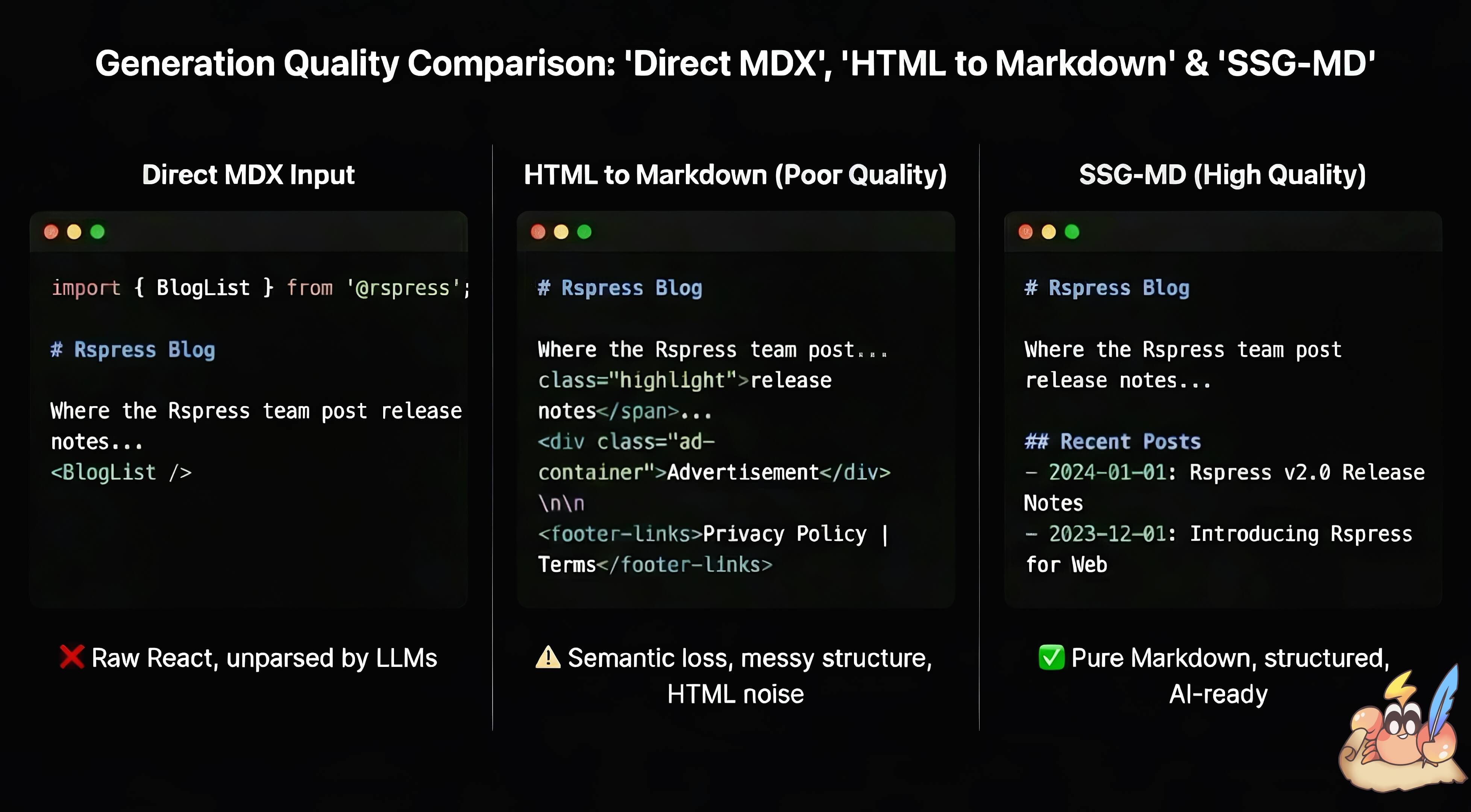
In React-based frontend frameworks, extracting static information from dynamically rendered content is often difficult. MDX has the same challenge: `.mdx` files contain Markdown content but can also embed React components, making docs more interactive. Rspress lets users enhance docs with MDX fragments, React components, Hooks, and TSX routes, but this dynamic content creates problems when converted to Markdown:
- Feeding raw MDX to AI introduces code syntax noise and loses rendered React component content.
- Converting HTML to Markdown often produces poor results, making information quality hard to guarantee.
[Static Site Generation (SSG)](https://rspress.rs/guide/basic/ssg.md) generates static HTML for crawlers and improves [SEO](https://en.wikipedia.org/wiki/Search_engine_optimization). SSG-MD addresses a similar problem for AI tools: it improves [GEO](https://en.wikipedia.org/wiki/Generative_engine_optimization) and the quality of static information for large language models. Compared with HTML-to-Markdown conversion, rendering from React's virtual DOM gives SSG-MD a richer information source.
### How does SSG-MD work?
1. Rspress internally implements a `renderToMarkdownString` method similar to `renderToString` in `react-dom`, which renders React components to Markdown strings:
```tsx
import { renderToMarkdownString } from 'react-render-to-markdown';
// HTML elements are converted to the corresponding Markdown syntax
renderToMarkdownString(
foo
bar
,
);
// Output: '**foo**bar'
// React components and Hooks are supported
const Article = () => {
return (
<>
Hello World
This is a paragraph.
);
};
renderToMarkdownString();
// Output: '# Hello World\n\nThis is a paragraph.\n'
```
In principle, this API works for any site built with React; see [react-render-to-markdown](https://www.npmjs.com/package/react-render-to-markdown) if you're interested.
2. Rspress uses a custom remark plugin, `remarkSplitMdx`, to preprocess MDX files before rendering. This plugin splits the MDX AST, separating pure Markdown content from JSX components: Markdown text is serialized as string literals, while JSX components and MDX expressions (for example, `{variable}`) are preserved as React elements. This ensures that Markdown content passes through as-is without being processed by React rendering, while dynamic components are rendered by `renderToMarkdownString`.
For example, the following MDX:
```mdx
# Hello
Some **bold** text.
{window.title}
```
is transformed into a component like this:
```tsx
function _createMdxContent() {
return (
<>
{'# Hello\n\nSome **bold** text.\n'}
{window.title}
);
}
```
3. Rspress provides the `import.meta.env.SSG_MD` environment variable so React components can distinguish SSG-MD rendering from browser rendering and customize their output:
```tsx
export function Tab({ label }: { label: string }) {
if (import.meta.env.SSG_MD) {
return <>{`**Here is a Tab named ${label}**`};
}
return {label}
;
}
```
4. Rspress's internal component library is adapted for SSG-MD, so components render meaningful Markdown during the SSG-MD phase. For example:
```tsx
```
It is rendered as:
````md
```sh [npm]
npm create rspress@latest
```
```sh [yarn]
yarn create rspress
```
```sh [pnpm]
pnpm create rspress@latest
```
```sh [bun]
bun create rspress@latest
```
```sh [deno]
deno init --npm rspress@latest
```
````
## Accept: text/markdown: Return Markdown based on the request header
In November 2025, [Claude Code lead Boris Cherny wrote on X](https://x.com/bcherny/status/1988860326306087102):
> In the next version of Claude Code, Claude’s WebFetch tool automatically adds Accept: “text/markdown, \*” to requests which helps docs sites provide token-efficient docs.
[Cloudflare has also observed](https://blog.cloudflare.com/markdown-for-agents/) that coding Agents such as Claude Code and OpenCode send an `Accept` request header containing `text/markdown`.
Agent clients such as Claude Code and documentation sites such as Bun were among the first to adopt the `Accept: text/markdown` convention. Compared with HTML, Markdown excludes page chrome such as navigation, styles, and scripts, uses less context, and eliminates the need to extract the main content from HTML. Agents can therefore obtain usable content more quickly. If a website already produces Markdown, supporting this request header makes these benefits reliable instead of depending on each client to parse HTML itself.
Rspress is a purely static framework and has no deployment server that selects HTML or Markdown based on the request header. Supporting the header is still straightforward: configure a rule on the hosting provider. The Rspress website uses a Cloudflare rewrite. Requests containing `Accept: text/markdown` are internally rewritten to the corresponding `.md` file at the same path, while regular browsers still receive HTML from the same URL.
```bash
curl https://rspress.rs/guide/start/introduction \
-H 'Accept: text/markdown'
```
The response is Markdown:
```md
> For AI agents: the complete documentation index is available at
> https://rspress.rs/llms.txt ...
# Introduction
Rspress is a React-based static site generator built on Rsbuild.
```
## AFDocs: Checks and scoring
[AFDocs](https://afdocs.dev/) is the companion open-source tool for the [Agent-Friendly Documentation Spec](https://agentdocsspec.com/). Its [checks reference](https://afdocs.dev/checks/) lists 23 checks across 7 categories, together with the pass, warning, and failure criteria for each check.
Several Rspress Agent-friendly optimizations described in this article can be validated through AFDocs checks:
| Rspress capability | AFDocs checks | What it checks |
| ----------------------- | ---------------------------------------------------------------------------------------------------------------------------------------------------------------------------------------------------------- | --------------------------------------------------------- |
| `llms.txt` | [`llms-txt-exists`](https://afdocs.dev/checks/content-discoverability#llms-txt-exists), [`llms-txt-valid`](https://afdocs.dev/checks/content-discoverability#llms-txt-valid) | Whether Agents can find and parse the documentation index |
| SSG-MD | [`markdown-url-support`](https://afdocs.dev/checks/markdown-availability#markdown-url-support) | Whether every page provides Markdown |
| `Accept: text/markdown` | [`content-negotiation`](https://afdocs.dev/checks/markdown-availability#content-negotiation) | Whether the request header returns Markdown |
| `LlmsHint` | [`llms-txt-directive-html`](https://afdocs.dev/checks/content-discoverability#llms-txt-directive-html), [`llms-txt-directive-md`](https://afdocs.dev/checks/content-discoverability#llms-txt-directive-md) | Whether Agents can discover the index from a single page |
| Dual output | [`markdown-content-parity`](https://afdocs.dev/checks/observability#markdown-content-parity) | Whether HTML and Markdown express the same content |
Rspress also uses other AFDocs checks to guide further improvements, including metrics such as HTML size.
Run the following command to check a public documentation site:
```bash
npx afdocs check https://docs.example.com --format scorecard
```
The report includes the result of each check, suggested changes, and a score, making it useful for comparing the site before and after an Agent-friendly update.
[Mintlify's Agent Score](https://www.mintlify.com/blog/agent-score) is also based on this specification. In addition to the 23 baseline checks, it adds discoverability checks for full content, Agent Skills, and MCP Servers.
Notably, AFDocs does not evaluate writing quality or the correctness of Agent answers. It only checks a set of verifiable rules.
## injectLlmsHint: Expose the llms.txt URL
[AFDocs Content Discoverability checks](https://afdocs.dev/checks/content-discoverability) include two relevant rules:
- `llms-txt-directive-html`: When an Agent directly visits an HTML page, can it discover that the site has `llms.txt` and a Markdown version of the current page?
- `llms-txt-directive-md`: When an Agent receives a Markdown page, can it discover where to find the entire documentation site?
Even when a website provides Markdown, an Agent entering through a deeply nested page may not know that the current page has a Markdown version or that `/llms.txt` exists. Each page therefore needs to expose these entry points explicitly.
Rspress provides the [`injectLlmsHint`](https://rspress.rs/api/config/config-theme.md#injectllmshint) configuration. After SSG-MD is enabled, Rspress injects visually hidden plain text near the beginning of the main content in generated HTML:
```html
For AI agents: the complete documentation index is available at https://example.com/llms.txt, the full documentation bundle is available at https://example.com/llms-full.txt, and this page is available as Markdown at https://example.com/guide/index.md.
```
This does not use `display: none`, `hidden`, or `aria-hidden`. The URLs also appear directly in plain text instead of being nested in link elements. The hint remains invisible to readers but stays in the DOM, allowing Agents that parse HTML or convert HTML to Markdown to preserve and read the directive.
[The AFDocs `llms-txt-directive-html` rule](https://afdocs.dev/checks/content-discoverability#llms-txt-directive-html) emphasizes the same requirement: a directive can be visually hidden with techniques such as `clip-rect` or `sr-only`, but it must remain in the DOM and survive HTML-to-Markdown conversion.
The Markdown output uses a blockquote:
```md
> For AI agents: the complete documentation index is available at
> https://example.com/llms.txt, the full documentation bundle is available at
> https://example.com/llms-full.txt.
```
Because the Agent already has the current page in Markdown, the hint includes only `llms.txt` and `llms-full.txt`. The two outputs correspond to the `llms-txt-directive-html` and `llms-txt-directive-md` checks.
## References
- [The /llms.txt file](https://llmstxt.org/)
- [Rspress: llms.txt (SSG-MD)](https://rspress.rs/guide/basic/ssg-md)
- [Boris Cherny: Claude Code WebFetch Accept request header](https://x.com/bcherny/status/1988860326306087102)
- [Cloudflare: Introducing Markdown for Agents](https://blog.cloudflare.com/markdown-for-agents/)
- [Agent-Friendly Documentation Spec](https://agentdocsspec.com/)
- [AFDocs: Checks Reference](https://afdocs.dev/checks/)
- [Mintlify: Is your documentation agent-ready?](https://www.mintlify.com/blog/agent-score)